

Corral, Appaloosa's domain filtering, is available on iOS, iPadOS and Android. It filters managed and COPE devices; personal devices (BYOD) are not filtered. MDM web filtering is configured entirely from your Appaloosa console: one switch, nine categories to tick, and a tool to check what gets blocked.
In short: open a managed Android or managed iOS configuration, go to the "Web filter" tab, turn filtering on and tick the categories you want. Corral is included in the Advanced Add-On and in the Enterprise plan. For product details, the Corral network filtering page remains the reference.
Why filter the web from your MDM
A mobile antivirus watches apps, not the destination of a link. An employee taps a link in a text message, lands on a fake sign-in page and types a password. No malware is involved, so no antivirus has anything to say. A mobile EDR covers this case, but it comes with an agent, one more console and someone to read the alerts. A domain filter fills the gap between the two: if the domain is on a blocklist, the connection never opens.
The numbers point the same way:
- In the Verizon Mobile Security Index 2025 (April 2025 survey of 762 professionals), 80% of organizations saw mobile phishing attempts against their employees, and user behavior is the most cited cause of leaks (44%).
- In the Verizon 2026 Data Breach Investigations Report (p. 13): "45% of employees are now considered regular users of AI (authorized or not) on their corporate devices, up from 15% in the previous year." The same report adds that "67% percent of users are using non-corporate accounts on their corporate devices to access AI services".
The second figure explains two of Corral's categories: AI and file sharing can be blocked the same way as malicious domains, if your organization decides so.
What Corral does on Android and on iOS
Corral filters at the domain level, on the device. Browsing stays on the device: Corral never sends the sites people visit. It reports a technical status to your MDM console (filtering active, health, list freshness). It also produces anonymous crash reports, sent automatically to our error-tracking tool (Bugsnag).
Android 11 and later
As soon as a category is turned on in the console, the Corral app (Google Play) is installed and configured automatically. Users can neither remove it nor turn it off. On a fully managed device, Corral filters the whole device; on a COPE device, only the work profile. Known encrypted-resolution services (DoH and DoT) are blocked, so they can't be used to get around the filter.
iOS 16 and later, iPadOS 16 and later
On managed iPhones and iPads, filtering runs through the Appaloosa agent, which must therefore be installed. Corral is incompatible with iOS's built-in web filter, which has to stay on "None".
The lists, and what is never blocked
The categories rely on the HaGeZi lists, the UT1 lists from Université Toulouse Capitole and the Nullgen AI Blocklist. The dashboard compiles one list per configuration. The domains needed to manage devices (Google, Play, Apple, Appaloosa, updates) are never blocked, so a filter that is too strict can't cut you off from your own devices.
You choose among nine categories, turned on one by one:
- Threat protection
- Enhanced threat protection
- Ads and trackers
- Enhanced ads and trackers
- Adult and illicit content
- Entertainment and streaming
- Social media
- AI (ChatGPT, Claude)
- File sharing (WeTransfer, Dropbox)
How to turn on web filtering in the console
There is nothing to install by hand on the devices. It all happens in the configuration.
1. Open the configuration
Open the managed Android or managed iOS configuration your devices are attached to.
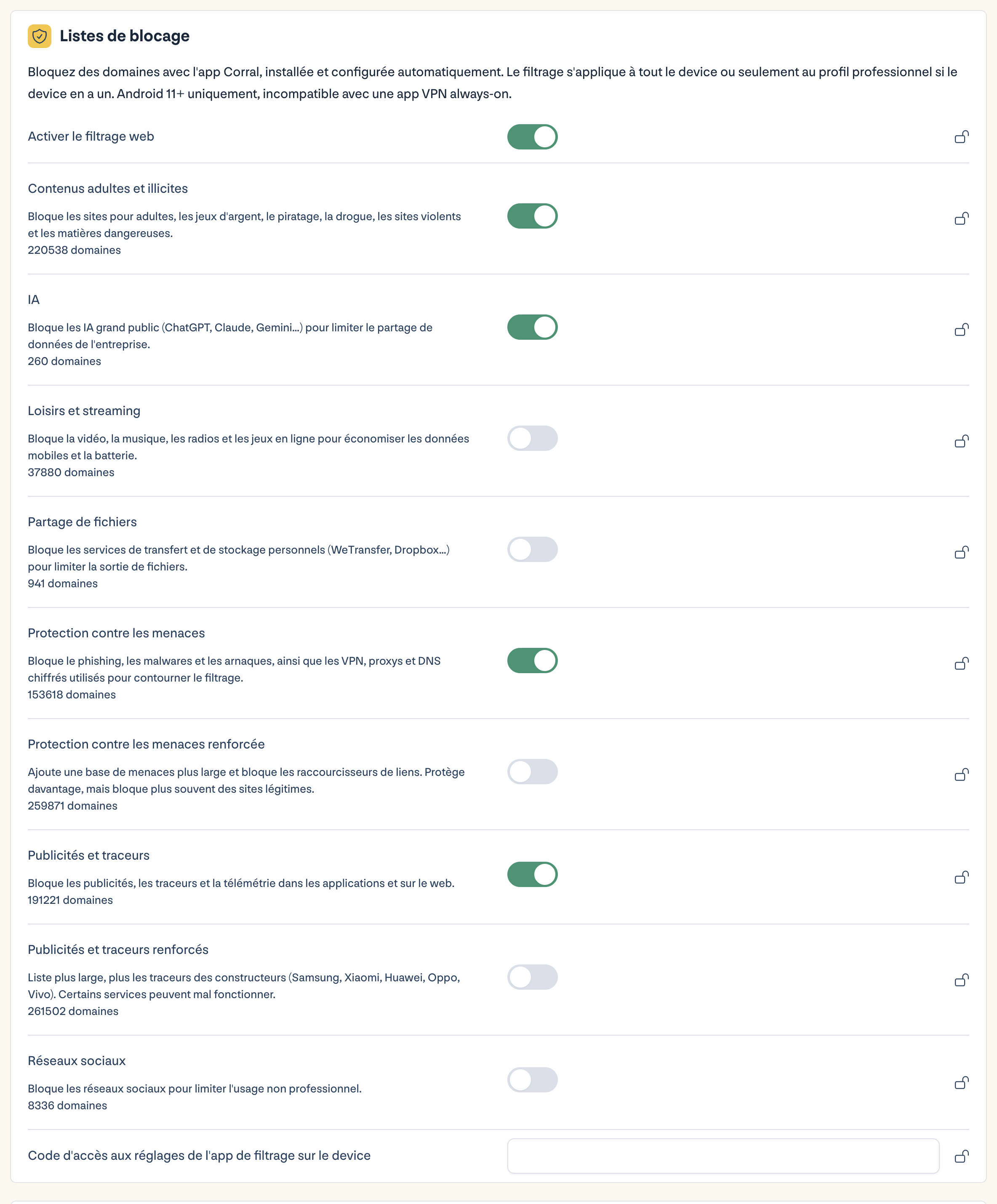
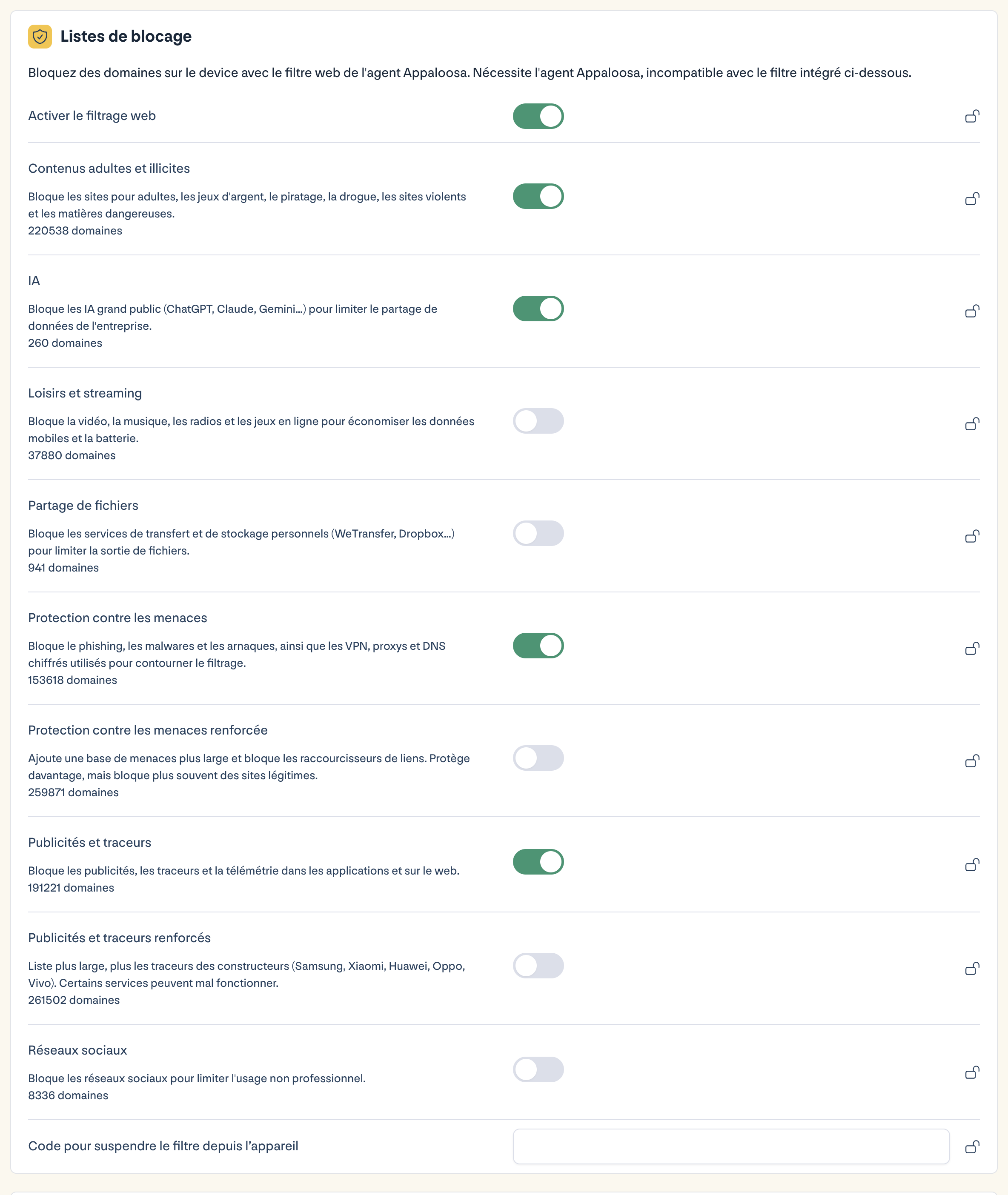
2. "Web filter" tab, "Blocklists" card
Turn on the "Enable web filtering" switch, then tick the categories that matter to you. The admin code is set in the same card. On Android, the Corral app reaches the devices as soon as the first category is turned on.
3. Test a domain
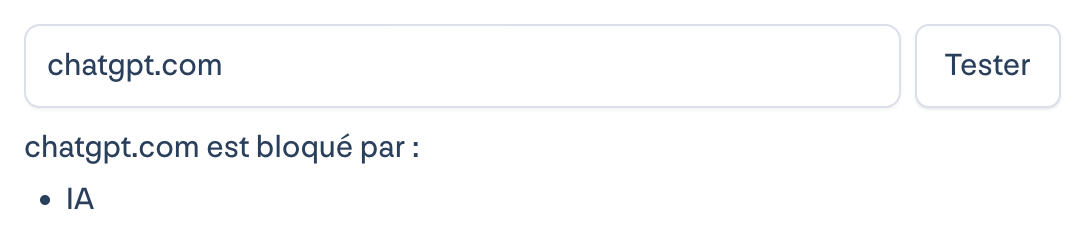
The "Test a domain" tool tells you which list blocks a given domain. It is the quickest way to understand why a site doesn't open, or to check that a site is filtered before you tell your teams. Enter chatgpt.com, for example, and the tool answers that it is blocked by the "AI" category.
What Corral doesn't do
We'd rather you hear it from us than find out.
- Personal devices (BYOD) are not filtered: the app says "not filtered on this device".
- On Android, Corral doesn't coexist with another always-on VPN app in the same configuration.
- On iOS, it is incompatible with iOS's built-in web filter, which has to stay on "None".
- It isn't available for macOS or Windows.
- A blocked domain doesn't show a Corral page: the browser shows its own error.
- Corral fails open: if something breaks, the device keeps its connection rather than being cut off from the network.
FAQ
Which devices does Corral filter?
Managed and COPE devices, on iOS 16 and later, iPadOS 16 and later and Android 11 and later. Personal devices (BYOD) are not filtered.
What does Corral see of employees' browsing?
Browsing stays on the device: Corral never sends the sites people visit. It reports a technical status to your MDM console (filtering active, health, list freshness). It also produces anonymous crash reports, sent automatically to our error-tracking tool (Bugsnag).
Is Corral a web content filter or a domain filter?
A domain filter: Corral blocks a domain that is on a list, not a page URL and not the content of a page. On Android, filtering runs through a local VPN on the device; on iOS and iPadOS, through the web filter of the Appaloosa agent.
What happens if a legitimate site is blocked?
Use the "Test a domain" tool to see which list blocks it, then decide which category to keep or remove. The user sees their browser's error.
How much does Corral cost?
Corral is included in the Advanced Add-On and in the Enterprise plan, with no price of its own. The Advanced Add-On costs €1 excl. VAT per device per month on top of the Business plan; details are on the pricing page.
Do I have to install anything on the devices?
Not by hand. On Android, the Corral app installs and configures itself as soon as a category is turned on. On iOS and iPadOS, filtering runs through the Appaloosa agent, which has to be present.
Try Corral
You can try Appaloosa for 14 days, no credit card. To see Corral on your own devices, book a demo.