Corporate Documents,
On Every Device
Push files to managed devices without requiring a single email account.
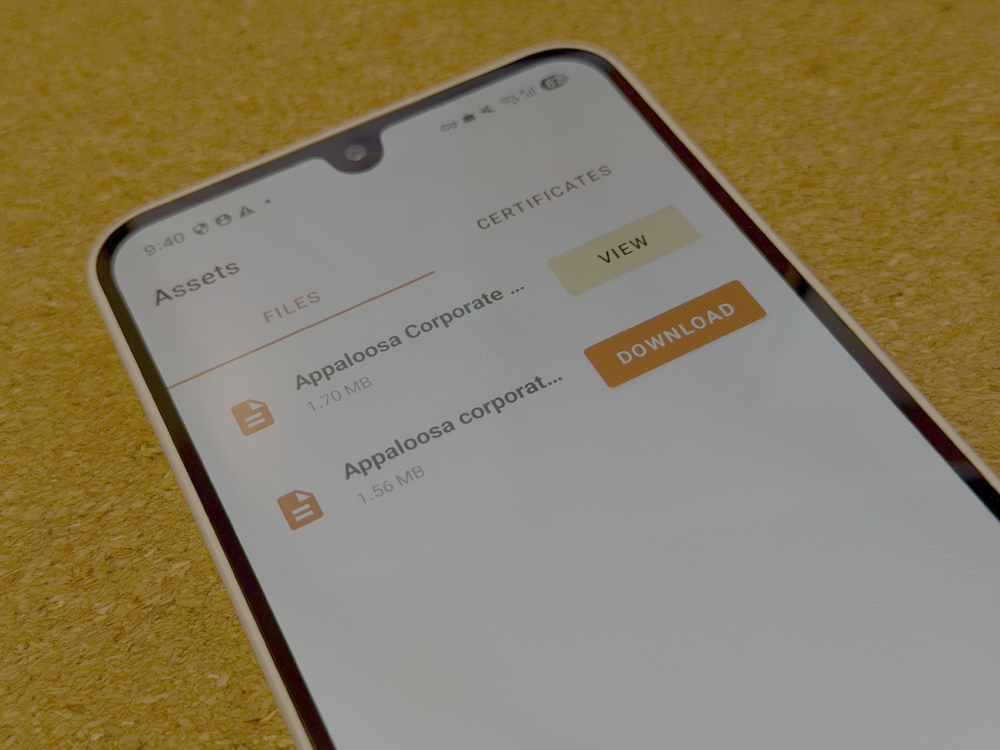
Appaloosa's file sync lets IT teams upload documents from the dashboard and deliver them to the right devices instantly. Procedures, manuals, onboarding guides: employees open the Appaloosa app and find everything they need. No Office 365, no Google account, no complexity.
Hosted in France. ISO 27001 certified.
Stop Emailing Files Around
Distributing documents to a mobile fleet usually means emails, shared drives, or USB transfers. Non-technical users struggle to find the right file, outdated versions circulate for weeks, and IT has no visibility over what landed where. File sync solves this: upload once, deploy to the right devices, done.
-
Dashboard Upload
Upload and Deploy
Upload any document from the Appaloosa dashboard. Files are delivered to the agent app on targeted devices, ready for employees to download and use.
-
Targeted Deployment
Right Files, Right Devices
Assign files to specific user groups or device policies. Safety manuals to the warehouse team, sales sheets to field reps, onboarding docs to new hires. Each group sees only what they need.
-
Auto Cleanup
Files Follow the User
When a user changes role or a device is unenrolled, files are removed automatically. No sensitive documents left on reassigned hardware. No manual cleanup needed.
Deploy Files in Four Steps
Upload
Upload documents from the Appaloosa dashboard. Any file type: PDFs, guides, manuals, certificates.
Target
Assign files to user groups or device policies. Each group receives only the documents relevant to their role.
Deploy
Files are pushed to the Appaloosa agent app on each targeted device, ready for download.
Update
Need a new version? Delete the old file and upload the replacement. Devices receive the update on next sync.
File Sync in Action
Employee Onboarding
Push welcome packets, HR policies, and training materials to new hire devices on day one. No email setup required.
Field Operations
Deliver procedures, safety manuals, and technical guides to field workers who may not have access to email or cloud storage.
Compliance Docs
Distribute compliance certificates, regulatory documents, and internal policies to every managed device. Files are removed automatically when a device is unenrolled.
See File Sync in Action
Book a 20-minute demo and see how Appaloosa delivers documents to your fleet without complexity.
Get Started- Free 14-day trial
- Cancel anytime, no questions asked.
- Expert Support
- Get customized and expert onboarding to get started.
- What is file sync in Appaloosa?
- File sync lets IT administrators push corporate documents to managed iOS and Android devices through the Appaloosa agent app. Upload files from the dashboard, assign them to user groups or device policies, and employees can download them directly on their device. No email account, cloud storage, or productivity suite required.
- What file types are supported?
- Appaloosa supports any file type. The most common use cases involve PDFs, Word documents, spreadsheets, images, and certificates, but there is no restriction on format. Files are delivered to the Appaloosa agent app where employees can download and open them with the appropriate viewer on their device.
- Can I send different files to different teams?
- Yes. Files are assigned to user groups or device policies, so each team receives only the documents relevant to their role. For example, warehouse staff get safety procedures while sales reps get product catalogs. You control exactly which files reach which devices.
- What happens to files when a device is unenrolled?
- Files are removed automatically when a device is unenrolled or when a user is reassigned. No sensitive documents remain on hardware that is no longer under your control. This applies to both voluntary unenrollment and remote wipe scenarios.
- How do I update a document that has already been deployed?
- Delete the old version from the dashboard and upload the new one. The updated file will be deployed to the same target groups on the next sync cycle. Devices receive the new version automatically.
- Do employees need an email or Office 365 account to access files?
- No. Files are delivered through the Appaloosa agent app, which does not require any email account, cloud storage login, or productivity suite. This makes file sync ideal for non-technical workers, frontline staff, and devices deployed without a logged-in user.
- Is the file hosting secure?
- Yes. All files are hosted on Appaloosa's ISO 27001 certified infrastructure in France. Files are encrypted in transit and automatically removed from devices upon unenrollment. Only authorized devices within your MDM fleet can access the deployed documents.