

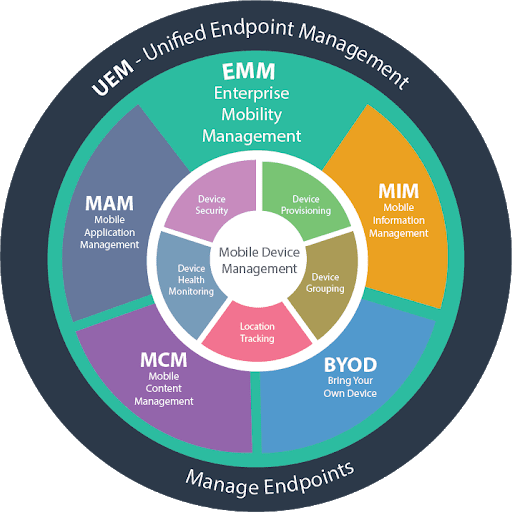
Enterprise Mobility Management (EMM) is a framework of tools and policies that gives IT teams centralized control over mobile devices, applications, and corporate data across an organization. EMM combines Mobile Device Management (MDM), Mobile Application Management (MAM), Mobile Content Management (MCM), and identity controls into a single platform. For companies managing 50 or more mobile devices with sensitive data, EMM is the standard approach to securing and orchestrating a mobile workforce.
If you're picking a platform rather than mapping out the EMM category, the Appaloosa device management page shows what Appaloosa covers on the device, app and policy side, and where it stops.
What does an EMM platform actually do?
An EMM platform sits between your employees's devices and your company's data. It answers three questions: who can access what, on which device, and under what conditions.
At a practical level, here is what that looks like for an IT team:
- Device enrollment: New phones and tablets configure themselves automatically through zero-touch enrollment (Android Enterprise or Apple Automated Device Enrollment). No manual setup needed.
- Policy enforcement: Admins set rules for password complexity, encryption, OS version minimums, VPN usage, and Wi-Fi access. Policies apply automatically based on user group and device ownership model.
- App lifecycle management: IT pushes apps silently, manages updates, pins versions for regulated environments, and removes apps when employees leave. A private enterprise app store handles self-service distribution.
- Data protection: Containerization separates work and personal data on BYOD devices. Managed open-in policies prevent data leaks between personal and work apps.
- Identity integration: Connection to Azure AD, Okta, or Google Workspace enables conditional access. Devices that fail compliance checks are blocked from email and corporate apps automatically.
- Compliance reporting: Real-time dashboards show encryption status, jailbreak detections, policy violations, and audit-ready reports for HIPAA, GDPR, or SOC 2.
EMM vs. MDM vs. MAM vs. UEM: what is the difference?
These acronyms get thrown around interchangeably. They should not be, because they describe different scopes of control.
MDM handles device-level management: enrollment, configuration profiles, remote lock and wipe, OS update control. MDM was the first generation of enterprise mobile tools, starting around 2010 when iPhones appeared in corporate networks. unified endpoint management platform covers these fundamentals across iOS, Android, macOS, and Windows.
MAM focuses on the app layer. Which apps can users install? How are in-house apps distributed? Can users copy data between managed and personal apps? MAM matters most in BYOD environments where IT cannot manage the entire device. An enterprise app store is the typical MAM delivery mechanism.
EMM bundles MDM + MAM + content management + identity controls. It became the industry standard between 2014 and 2016 when organizations realized device management alone was insufficient. EMM added SSO integration, conditional access, data loss prevention, and compliance automation.
UEM (Unified Endpoint Management) extends EMM beyond mobile to all endpoints: desktops, laptops, IoT devices, wearables. Gartner rebranded the market as UEM in 2018. In practice, most EMM vendors now offer UEM capabilities. The distinction is shrinking.
Here is a quick comparison:
| Capability | MDM | MAM | EMM | UEM |
|---|---|---|---|---|
| Device enrollment and config | Yes | No | Yes | Yes |
| App distribution and control | Basic | Yes | Yes | Yes |
| Data containerization | No | Yes | Yes | Yes |
| Identity and conditional access | No | No | Yes | Yes |
| Desktops and IoT | No | No | No | Yes |
| Compliance reporting | Basic | No | Yes | Yes |
How EMM works in practice: device ownership models
Your EMM strategy depends on who owns the devices. Most organizations run a mix of these three models, each with different policy sets applied through the same EMM console.
BYOD (Bring Your Own Device) is the most privacy-sensitive setup. Employees use personal phones for work. EMM creates a work container that IT manages without touching personal apps, photos, or browsing history. Android's work profile and Apple's User Enrollment handle this separation at the OS level. The key: lightweight enrollment with clear boundaries, or users will resist.
COPE (Corporate-Owned, Personally Enabled) means the company buys the device but allows personal use. IT has full management rights and typically permits personal app installation outside the work profile. COPE gives IT more control while keeping employees satisfied with a single device.
COBO (Corporate-Owned, Business Only) is the strictest model. Devices are locked to business applications, often deployed in kiosk mode for retail associates, warehouse staff, or field technicians. No personal use. Full IT control.
A common pattern: office staff on BYOD, sales teams on COPE, frontline workers on COBO. The EMM platform applies different policy sets automatically based on user group assignment in your identity directory.
Who needs EMM?
EMM makes sense when at least two of these apply to your organization:
- 50+ mobile devices under management
- Employees access corporate email, files, or apps from mobile devices
- Compliance requirements exist (HIPAA, GDPR, SOC 2, ISO 27001, NIS2)
- Multiple OS platforms (iOS and Android at minimum)
- BYOD is allowed or being considered
If you run a 10-person team with company iPhones, Apple Business Manager with basic MDM is probably enough. A hospital with 2,000 devices across nursing, medical, and administrative staff, each with different access needs and HIPAA constraints, needs full EMM.
Industry triggers also drive adoption. Healthcare needs EMM for HIPAA compliance on mobile. Financial services need data loss prevention across trader and advisor devices. Retailers deploying shared tablets for POS and inventory need kiosk management and remote troubleshooting. Education institutions managing shared iPads across classrooms need app cycling and content filtering.
Deploying EMM: what a realistic timeline looks like
EMM deployment is a project, not an install. Teams that try to rush enrollment across an entire fleet on day one generate a wave of help desk tickets and user frustration. A phased approach works better.
Weeks 1 to 2: Discovery. Inventory existing devices. Identify ownership models in use. Map security gaps. Document compliance requirements. Talk to department heads about their mobile workflows and pain points.
Weeks 3 to 4: Policy design. Define enrollment methods per device type and OS. Set security baselines for passwords, encryption, and OS versions. Design your app distribution strategy: which apps are mandatory, which are optional, which are blocked. Map user groups from your identity directory to policy sets in the EMM console.
Weeks 5 to 6: Pilot. Deploy to 20 to 50 users across different roles and device types. Track four metrics: enrollment completion rate, help desk tickets generated, user complaints, and policy compliance rate. A successful pilot hits 95%+ enrollment and fewer than 5 support tickets per 10 users.
Weeks 7 to 8: Full rollout. Fix friction points from the pilot. Update user documentation. Roll out in waves, starting with departments that have the highest security requirements or the most to gain.
Ongoing. Review compliance reports monthly. Adjust policies as Apple and Google release new management APIs with each OS version (Android 16 and iOS 18 both brought significant changes to work profile and declarative management). Update your app catalog. Refresh enrollment flows during device refresh cycles.
Explore
See the full platform
Enrollment, apps, security, remote support: all in one place.
Explore Appaloosa →Evaluating EMM vendors: what matters
The EMM market has consolidated since 2020, but you still have meaningful choices. Here is what to focus on:
Platform coverage. Does the vendor support your current and planned device mix? Some are strong on Apple but weak on Android Enterprise features, or vice versa. Check support for the latest OS versions and management APIs.
Enrollment friction. Count the steps a user needs to complete. The best EMM platforms support zero-touch enrollment where devices configure themselves. Anything requiring a 15-step guide will generate support tickets and resistance.
App management depth. Can you distribute public store apps and private in-house apps? Manage app configurations remotely (AppConfig)? Offer a self-service app catalog? Handle VPP and Managed Google Play licensing?
Integration ecosystem. Check for connectors to your identity provider, SIEM, ticketing system, and compliance tools. API quality matters for custom automation workflows.
Pricing model. Per-device or per-user pricing? Does a BYOD phone count the same as a corporate-owned tablet? Are MAM and content management included or add-on modules?
Cloud vs. on-premises. SaaS-based EMM (also called cloud MDM) is the right default for most organizations: faster deployment, automatic updates, lower infrastructure overhead. On-premises only makes sense for strict data sovereignty requirements or air-gapped networks.
EMM security: the three threat vectors
Mobile security threats target three surfaces. Your EMM configuration needs to address all three.
Network threats. Attackers set up rogue hotspots or intercept traffic on public Wi-Fi. EMM enforces VPN usage on untrusted networks and controls which networks devices can join. Some EMM platforms integrate with Mobile Threat Defense (MTD) tools to detect network-level attacks in real time.
Device threats. Jailbroken or rooted devices bypass OS security controls. EMM detects compromised device status and automatically blocks access to corporate resources. It also enforces OS updates, preventing devices from running versions with known vulnerabilities.
App threats. Malicious apps appear even in official stores. EMM controls which apps can be installed, maintains an approved app catalog, and can remove unauthorized apps remotely. For BYOD, MAM-level controls prevent data leaks without full device management.
The other acronyms in the EMM family: MIM, MCM and MEM
MDM, MAM and UEM are the three you will meet in most vendor decks, but an EMM strategy also touches three narrower categories. They are worth knowing so you can tell a real gap from a renamed feature.
- MIM (Mobile Information Management), sometimes sold as MCM (Mobile Content Management): controls the documents themselves rather than the device or the app. Think encrypted document containers, controlled sharing and retention rules on files that travel between apps.
- MEM (Mobile Expense Management): tracks data plans, roaming and per-device telecom spend. It is a finance tool, not a security tool, and it is usually a separate product from your MDM.
Appaloosa does not sell MIM, MCM or MEM modules. If document-level rights management or telecom expense tracking is a hard requirement, plan for a second tool rather than expecting an MDM to cover it.
Why one EMM policy is rarely enough
The common assumption is that a mid-sized company with a single line of business needs a single mobility policy. In practice, usage splits hard along job roles, and so do the requirements.
A field engineer on a rugged Android handset, a sales rep on a personal iPhone under BYOD, and a store associate on a shared kiosk tablet have almost nothing in common: different hardware, different ownership models, different confidentiality constraints, different acceptable levels of restriction. Group-level policies are what make that work inside one console.
Multi-site or franchise organisations add a second axis. Each site may have its own IT contact, its own device supplier and its own local rules, while the security baseline has to stay identical everywhere. When you evaluate an EMM platform, test whether it can delegate administration per site without duplicating the policy catalogue, and whether shared devices can be handed from one user to the next without leaking the previous user's data.
Frequently asked questions
What does EMM stand for?
EMM stands for Enterprise Mobility Management. It is the set of tools and policies a company uses to secure and manage the phones, tablets, and increasingly the laptops that employees use for work. EMM grew out of MDM once IT teams needed to manage apps and data, not just the device itself.
What is an EMM platform?
An EMM platform is the single console where IT enrolls devices, pushes apps and configuration, enforces security policies, and wipes data when a device is lost or an employee leaves. Instead of touching each device by hand, you set a policy once and it applies to every device in the matching group, across iOS, Android, Windows, and macOS.
What is the difference between EMM and UEM?
EMM focuses on mobile: phones and tablets, plus the apps and data on them. UEM (Unified Endpoint Management) extends the same model to every endpoint, including Windows and macOS laptops, from one console. In practice the line has blurred, and most modern EMM products now manage laptops too, which is why vendors often use the two terms interchangeably.
How much does an EMM solution cost?
Most EMM pricing runs between 2 and 10 EUR per device per month, billed as a subscription. A 300-device fleet typically lands between 600 and 3,000 EUR per month depending on the feature tier. Check what is bundled: kiosk mode, remote support, and zero-touch enrollment are sometimes priced as add-ons, so compare included features before you compare headline prices.
Getting started with enterprise mobility management
Start with your most pressing use case: securing BYOD email, distributing apps to field workers, or meeting a compliance audit deadline. Build from there. You do not need to deploy every EMM capability on day one.
Appaloosa provides EMM capabilities that cover the full spectrum, from basic MDM and app management to zero-touch enrollment, kiosk mode for shared devices, and remote support for troubleshooting. Start a free trial to see how it fits your mobile strategy.
Ready to try Appaloosa? Start free