

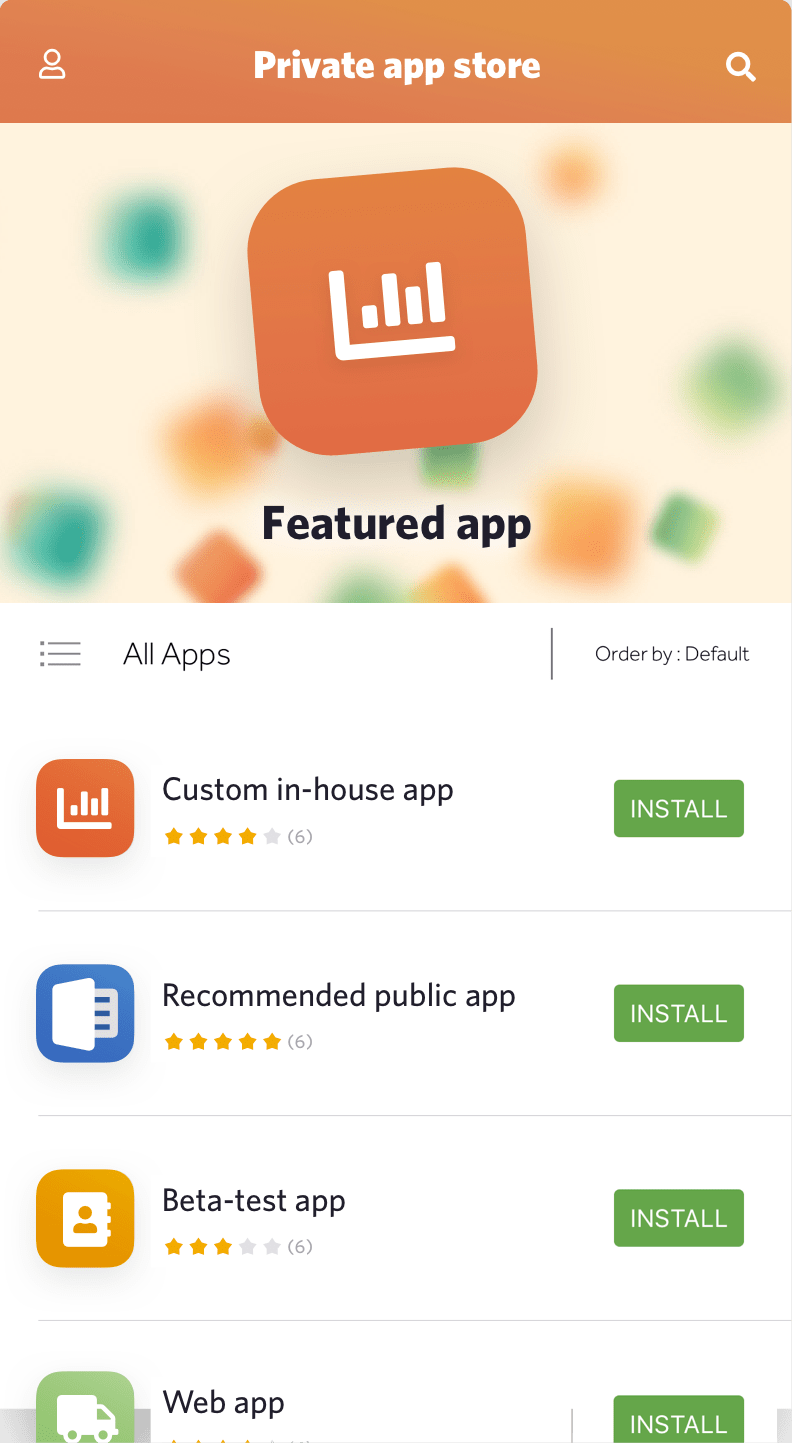
An enterprise app store is a private, curated portal where IT distributes approved mobile applications to employees. Unlike public app stores, it gives the organization complete control over what gets installed, who gets it, and when it gets updated. The user experience looks familiar, but the backend is entirely under IT's control.
An enterprise app store is a company-owned catalog where employees install approved mobile apps: public store titles licensed through Apple Business or Managed Google Play, in-house IPA and APK builds, and web apps. IT decides who sees which app by user group, pushes mandatory apps silently to managed devices, and pins versions. It usually ships as part of an MDM or MAM platform, not as a separate product.
Comparing products rather than learning the concept? The Appaloosa enterprise app store page covers the catalogue, per-group visibility and in-house app distribution on iOS and Android.
Why a Private App Store Matters
More than 74% of companies allow (or plan to allow) employees to use their smartphones for business purposes. That creates a distribution problem. You cannot publish internal apps to the Apple App Store or Google Play. Sensitive business logic should not live in public stores. And even for approved third-party apps, you need control over versions, licenses, and access.
A private enterprise app store solves this. It sits between your MDM infrastructure and your employees' devices, serving as the single source of truth for every app your organization uses. Employees browse, install, and update apps from one place. IT manages the catalog, controls access by user group, and pushes mandatory apps silently to enrolled devices.
The alternative, manual distribution through email attachments, shared drives, or ad hoc provisioning profiles, does not scale beyond a handful of devices and creates serious security problems.
What Goes in an Enterprise App Catalog
A well-structured app catalog typically contains three types of applications:
Public store apps. Approved third-party apps from the Apple App Store or Google Play. IT pre-approves these and makes them available through the catalog. On iOS, Volume Purchase Program licenses are assigned to devices through Apple Business Manager. On Android, apps are approved through Managed Google Play. Users see only the approved subset, not the full public store.
In-house apps. Custom applications built specifically for your organization. These contain proprietary business logic, internal API connections, or sensitive data. They cannot be distributed through public stores. The enterprise app store hosts the IPA (iOS) or APK (Android) directly, signs it with enterprise certificates, and distributes it to enrolled devices. Updates are pushed without requiring App Store review.
Web apps. Browser-based applications that can be added to the catalog and pinned to the device home screen as bookmarks or progressive web apps. Users launch them like native apps. No installation required, and access can be revoked instantly by removing the shortcut from the catalog.
Key Features of a Well-Built Enterprise App Store
Role-Based Access and User Groups
Not every employee needs every app. A sales rep needs CRM tools. A warehouse worker needs inventory and barcode apps. A developer needs testing and debugging tools. User groups let IT target specific applications to specific employees. When someone changes roles, their available apps update automatically based on their new group membership. When they leave the company, all corporate apps are removed.
Silent Installation and Mandatory Apps
On supervised iOS devices and fully managed Android devices, IT can push apps silently without user interaction. The app appears on the device without the employee needing to accept anything. For critical business applications, this ensures 100% adoption. For optional tools, the catalog offers a self-service experience where employees browse and install what they need.
Managed App Configuration
Managed app configuration (AppConfig on iOS, managed configurations on Android) lets IT pre-configure app settings before distribution. Server URLs, tenant IDs, single sign-on parameters, and custom settings for internal tools are pushed with the app. The employee launches it and it is already connected to the right backend. This eliminates manual setup steps and reduces the first-day support burden.
Version Control and Update Management
IT controls which version of each app is available in the catalog. Critical security updates can be pushed as mandatory upgrades with a deadline. For regulated environments where a specific version must stay pinned for compliance, the catalog prevents automatic updates until IT approves them. This level of control is not available through public app stores.
License Tracking
For paid apps distributed through Apple Business Manager's Volume Purchase Program or similar mechanisms, the catalog tracks license consumption. When an employee leaves, their license is reclaimed and reassigned. You get a real-time view of how many licenses are in use, which helps with budget planning and vendor negotiations.
The BYOD Balance: Security Without Intrusion
BYOD is where enterprise app stores become most important, and most delicate. Employees will not accept an MDM profile on their personal phone if they think IT can see their photos, read their messages, or track their location. The solution is strict separation.
On iOS, User Enrollment creates a managed APFS volume on the device. Corporate apps and data live there. Personal data is in a completely separate volume that MDM cannot access. On Android, the Work Profile creates an isolated container. The personal side has a different home screen, different notifications, and different app drawer. IT manages the work side only.
The enterprise app store distributes apps exclusively into the managed volume or work profile. When the employee leaves, IT removes the work container. Personal data is never touched.
Transparency is essential. Employees should know exactly what IT can see before they enroll. A one-page summary explaining what MDM can and cannot do on their personal device eliminates most resistance. The answer is always: IT can manage work apps and work data only. Nothing personal.
Explore
See the full platform
Enrollment, apps, security, remote support: all in one place.
Explore Appaloosa →Setting Up an Enterprise App Store: What the Process Looks Like
Implementing an enterprise app store is measured in hours, not months, when using a modern SaaS EMM platform. The key steps:
- Connect platform services. Link Apple Business Manager for iOS app distribution. Set up a Managed Google Play account for Android. Both are free and required for managing public store app licenses.
- Upload internal apps. Upload your IPA and APK files. The platform signs them with the appropriate enterprise certificate and hosts them. For iOS, this requires an Apple Developer Enterprise Program membership.
- Configure user groups. Map your directory groups (Active Directory, Azure AD, Okta) to app assignment policies. Define which groups get which apps automatically, and which apps are optional in the self-service catalog.
- Set up managed app configurations. Pre-configure settings for each app that supports managed configuration. Specify server URLs, tenant IDs, and any app-specific settings.
- Customize the interface. Most enterprise app store platforms let you apply your company's branding: logo, colors, and name. The app store should look like a company product, not a generic IT tool.
- Test with a pilot group. Enroll 15 to 20 devices across platforms. Verify silent installation works, optional apps appear in the catalog, updates push correctly, and app configurations are applied before first launch.
Integration with Your IT Infrastructure
An enterprise app store is most effective when connected to the rest of your stack:
Identity provider. Active Directory, Azure AD, or Okta group membership drives app assignment. New hires get the right apps on day one without IT manually configuring each device.
MDM/EMM platform. The app store is typically part of the MDM platform, not a standalone product. App distribution, device compliance, and policy enforcement share the same admin console.
CI/CD pipeline. Development teams use Jenkins, Bitrise, Fastlane, or similar tools to build and sign apps. The enterprise app store integrates with these pipelines so new builds are automatically published for beta testing or production rollout. This is especially valuable for teams running frequent releases of internal apps.
Software asset management. Track which apps are installed on which devices, monitor license consumption, and generate compliance reports for software audits.
Analytics: Understanding App Usage
A good enterprise app store gives IT visibility into what is actually happening across the fleet:
- Download counts and installation success rates per app
- Version distribution (how many devices are running each version)
- License utilization for paid apps
- App adoption rates by department or user group
These insights guide decisions about which apps to invest in, which licenses to renew, and which apps are unused and can be removed. They also help identify devices that missed an update, which is useful for security patch management.
Common Mistakes to Avoid
Building the catalog without user input. IT teams sometimes build app catalogs based on what they think employees need rather than asking. Run a short survey before launch. Unused catalogs get ignored.
Skipping managed app configuration. If employees have to manually configure server URLs and sign-in settings after installing an app, they will submit support tickets. Pre-configure everything that can be pre-configured.
Ignoring the BYOD communication problem. The biggest BYOD rollout failure is not technical. It is employees refusing to enroll because they are afraid IT will access their personal data. Communicate clearly about what is and is not managed before you ask anyone to enroll.
Not integrating with CI/CD. If developers have to manually upload new builds to the app store, release cycles slow down and the catalog falls out of date. Automate the pipeline from build to distribution.
Choosing the Right Enterprise App Store Solution
Most organizations do not need a standalone enterprise app store product. They need an EMM platform that includes app store capabilities. When evaluating options:
- Confirm it supports both iOS and Android with full feature parity, not just one platform with the other treated as an afterthought
- Verify it handles in-house app distribution (custom IPA and APK), not just App Store or Play Store links
- Check for Apple Business Manager and Managed Google Play integration for license management
- Confirm managed app configuration is supported for the apps you need to distribute
- Ask about CI/CD integrations (Jenkins, Bitrise, Fastlane)
- Evaluate the self-service catalog interface from the employee's perspective, not just the admin console
enterprise app store supports iOS, Android, and web apps from a single interface, with role-based access, managed app configuration, CI/CD integrations, and a self-service catalog that works on both platforms. It is part of Appaloosa's full MDM and MAM platform.
FAQ
What is an enterprise app store?
An enterprise app store is a private app catalog run by a company for its own employees and devices. It distributes three kinds of software: approved public apps from the App Store or Google Play, in-house apps that never go through public review, and web apps pinned to the home screen. Access is controlled per user group, and updates are pushed by IT rather than left to each employee.
What are enterprise apps?
Enterprise apps are applications built or licensed by an organization for internal use rather than sold to the public: field service tools, inventory scanners, sales dashboards, HR portals. On iOS they are packaged as IPA files and signed with a company certificate; on Android as APK or AAB files distributed through Managed Google Play or a private catalog. They typically connect to internal APIs and carry data that has no place in a public store.
What is an enterprise app platform?
An enterprise app platform is the software layer that hosts, signs, and distributes a company's apps to managed devices. In practice it is the app management (MAM) part of an MDM or EMM suite: it links to Apple Business and Managed Google Play for licenses, stores in-house builds, applies managed app configuration, and reports installs and versions per device. Standalone products exist, but most organizations get it bundled with device management.
How does a corporate app store differ from the public App Store or Google Play?
A corporate app store only shows apps IT has approved, and only to the groups entitled to them. Employees don't need a personal Apple Account or Google account to install, licenses belong to the company and are reclaimed when someone leaves, and IT can pin a version or force an update with a deadline. Public stores offer none of that control, and they don't accept internal apps at all.
Related reading: Managed App Configuration for Android Enterprise: How It Works
Ready to try Appaloosa? Start free