

Your company has 500 employees, three office locations, and a growing remote workforce. Half of them use company-issued phones, the other half bring their own. IT needs to push apps, enforce security policies, and wipe lost devices without disrupting anyone's workflow. This is exactly the problem Enterprise Mobility Management solves.
What Enterprise Mobility Management Actually Does
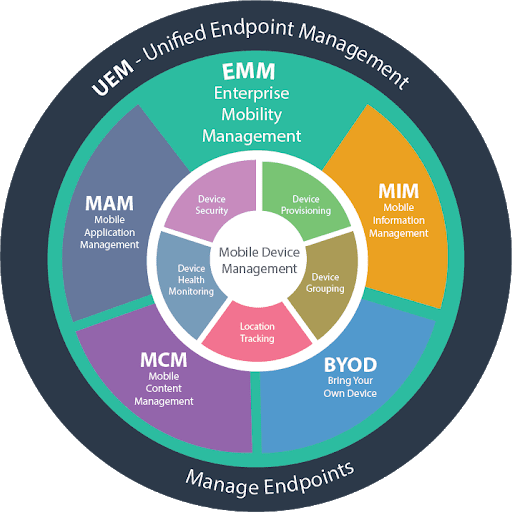
Enterprise Mobility Management (EMM) is a set of tools and policies that gives IT teams control over mobile devices, applications, and data across an organization. It combines several capabilities under one umbrella: device management (MDM), application management (MAM), content management (MCM), and identity management.
Think of EMM as the operating layer between your employees' devices and your company's data. It answers questions like: who can access what, on which device, under what conditions?
Most EMM platforms today handle iOS, Android, Windows, and macOS. Some extend to ChromeOS and Linux. The goal is consistent policy enforcement regardless of device type or ownership model.
EMM vs. MDM vs. UEM: Clearing Up the Alphabet Soup
These terms get used interchangeably, but they describe different scopes:
MDM (Mobile Device Management) focuses on device-level controls. It handles enrollment, configuration profiles, remote lock and wipe, OS update management, and basic security policies. MDM was the first wave of enterprise mobility tools, emerging around 2010 when iPhones started showing up in corporate networks. Appaloosa's MDM covers these fundamentals with zero-touch enrollment and automated configuration.
MAM (Mobile Application Management) adds a layer above the device. It controls which apps users can install, manages app configurations, handles license distribution, and creates private app catalogs. With an enterprise app store, IT teams can distribute in-house and approved third-party apps without going through public stores.
EMM bundles MDM, MAM, and content management together. It adds identity integration (SSO, conditional access), data loss prevention, and compliance reporting. EMM became the standard framework around 2014 to 2016 as organizations realized device management alone was not enough.
UEM (Unified Endpoint Management) extends EMM to cover all endpoints: desktops, laptops, IoT devices, wearables. Gartner reframed the market as UEM in 2018. In practice, most modern EMM vendors now offer UEM capabilities.
Core Components of an EMM Platform
A full EMM deployment typically includes these building blocks:
Device enrollment and provisioning. The first step is getting devices under management. Modern EMM supports zero-touch enrollment for Android (via Android Enterprise) and Apple (via Automated Device Enrollment through Apple Business Manager). Devices configure themselves out of the box, no IT hands-on required.
Policy engine. Admins define rules: password complexity, encryption requirements, allowed Wi-Fi networks, VPN configurations, OS version minimums. Policies apply automatically based on device type, user group, or ownership model (corporate vs. BYOD).
App lifecycle management. From deployment to updates to retirement. EMM handles silent app installation, mandatory updates, version pinning for regulated environments, and removal of apps when employees leave.
Content and data protection. Containerization separates work data from personal data on BYOD devices. Managed open-in policies prevent users from copying corporate documents to personal apps. Some EMM solutions include secure file sharing and encrypted email containers.
Identity and access management. Integration with identity providers (Azure AD, Okta, Google Workspace) enables conditional access. Example: allow email access only from devices that meet compliance requirements, enrolled in EMM, with an up-to-date OS.
Reporting and compliance. Real-time dashboards showing device compliance status, app inventory, security incidents. Automated reports for auditors covering encryption status, jailbreak detection, and policy violations.
Key Benefits of EMM for Organizations
Simplified device management. Automated enrollment means fleet managers focus on supervision rather than manual configuration. Each device can be provisioned remotely with the right apps and access policies. If a device is lost or stolen, IT can lock or wipe it immediately without touching the employee's personal data.
Enhanced collaboration and user experience. Employees access company resources securely from anywhere without complex VPN setups or manual certificate installation. The MDM server handles configuration automatically. For BYOD users, the work container is separate and unobtrusive.
Centralized app and document distribution. Through integrated MAM capabilities, IT pushes apps and updates to the entire fleet from one console. No individual device visits. Security policies apply consistently across all platforms. App configuration is pre-loaded before the user opens the app for the first time.
Multi-factor authentication integration. Modern EMM platforms enforce multi-factor authentication as a standard requirement. This ensures only authorized users reach corporate resources, even when a device is compromised.
Measurable ROI. Organizations using EMM solutions consistently report improvements in employee productivity, decision-making speed, customer service quality, and cross-team collaboration. The time savings from automated provisioning and zero-touch enrollment alone justify the investment for fleets of 100 or more devices.
BYOD, COPE, and COBO: Picking the Right Ownership Model
EMM strategy depends heavily on who owns the devices:
BYOD (Bring Your Own Device) is the most privacy-sensitive model. Employees use personal phones for work. EMM creates a work container that IT manages without touching personal apps or photos. The challenge: users resist anything that feels invasive. The solution: lightweight enrollment with clear separation between work and personal profiles.
COPE (Corporate-Owned, Personally Enabled) means the company buys the device but allows personal use. IT has full management rights but typically allows personal app installation outside the work profile. This gives IT more control while keeping employees satisfied.
COBO (Corporate-Owned, Business Only) is the strictest model. Devices are locked to business use only, often deployed in kiosk mode for frontline workers, retail associates, or field technicians. EMM manages every aspect of the device.
Most organizations run a mix. Office staff might be BYOD, sales teams on COPE, and warehouse workers on COBO. A good EMM platform handles all three models with different policy sets applied automatically based on user group.
EMM Best Practices
Use Cloud-Based Deployment
SaaS-based EMM deployments offer faster implementation, lower infrastructure cost, and easier scaling than on-premises alternatives. Cloud EMM eliminates hardware provisioning and maintenance. Updates are applied automatically by the vendor. For most organizations, cloud deployment is the right default. On-premises makes sense only for strict data sovereignty requirements or air-gapped environments.
Integrate with Your Identity Stack
Connect EMM to your identity provider (Active Directory, Azure AD, Okta, Google Workspace). User groups in your directory should map directly to device groups and policy sets in the EMM console. When someone joins the sales team in your directory, their device automatically receives the sales app bundle and access policies. When they leave, access is revoked automatically across all devices.
Look for EMM platforms that support LDAP, SAML, and SCIM for provisioning. Compliance with these protocols simplifies third-party integrations and reduces custom development work.
Secure Apps and Data, Not Just Devices
Mobile security threats focus on three vectors:
- Networks. Attackers set up fake hotspots or hijack existing ones to intercept traffic. EMM enforces VPN usage on untrusted networks and controls which networks devices can join.
- Devices. Jailbroken or rooted devices bypass OS security controls. EMM detects jailbreak status and blocks access to corporate resources from compromised devices.
- Apps. Malware appears in public app stores. EMM controls which apps can be installed, maintains an approved app catalog, and can remove unauthorized apps remotely.
App-level policy controls, accessible through EMM's MAM capabilities, allow data loss prevention without full device management. This matters for BYOD where IT manages apps but not the device itself.
Use Analytics to Drive Decisions
EMM platforms generate usage data that is only valuable if someone reviews it. Build a monthly review cadence covering:
- Compliance rate by department and device type
- App adoption and license utilization
- OS version distribution (identify devices that need updating)
- Security incidents: jailbreak detections, policy violations, failed enrollments
In-app behavioral and performance analytics within specific tools can also reveal how business apps are being used, which informs future app investment decisions.
Stay Current with Platform APIs
Apple and Google release new management APIs with each major OS version. Android Enterprise, in particular, provides security at the operating system level with work profile containerization that keeps business apps and data separate from personal activity. Administrators gain full control over the work profile, including enforced VPN use, copy-paste restrictions between work and personal apps, and the ability to wipe work data without touching personal content.
Choose an EMM vendor that adopts new Apple and Android management features promptly after each OS release. Delayed support means delayed access to security controls.
Who Needs EMM (and Who Does Not)
EMM makes sense for organizations that meet at least two of these criteria:
- More than 50 mobile devices to manage
- Employees access corporate data (email, files, apps) on mobile devices
- Compliance requirements exist (HIPAA, GDPR, SOC 2, ISO 27001)
- Multiple device platforms (iOS and Android at minimum)
- BYOD is allowed or planned
If your team is 10 people with company-issued iPhones, Apple Business Manager with basic MDM might be enough. If you are a hospital with 2,000 devices across nursing staff, doctors, and admin, each with different access needs, you need EMM.
Industry-specific triggers also apply. Healthcare organizations need EMM for HIPAA compliance on mobile devices. Financial services firms need it for data loss prevention. Retailers deploying shared devices for POS and inventory need it for kiosk management and remote troubleshooting.
Deploying EMM: A Practical Roadmap
Rolling out EMM is a project, not an install. Here is a realistic timeline:
Week 1 to 2: Discovery. Inventory existing devices, identify ownership models, map current security gaps, define compliance requirements. Interview department heads about mobile workflows.
Week 3 to 4: Policy design. Define enrollment methods per device type. Set security baselines (encryption, passcodes, OS versions). Decide on app distribution strategy. Design user groups and assign policy sets.
Week 5 to 6: Pilot. Deploy to a test group of 20 to 50 users across different roles and device types. Measure: enrollment completion rate, help desk tickets, user complaints, policy compliance rate.
Week 7 to 8: Iterate and expand. Fix friction points from the pilot. Update documentation. Roll out to the full organization in waves. Prioritize departments with the highest security requirements first.
Ongoing: Optimize. Review compliance reports monthly. Adjust policies as new OS versions release. Add new apps to the catalog. Update enrollment flows as device refresh cycles hit.
Evaluating EMM Vendors: What to Look For
The EMM market is crowded. When evaluating vendors, focus on these practical criteria:
Platform coverage. Does it support your current and planned device mix? Some vendors are strong on Apple but weak on Android, or vice versa.
Enrollment friction. How many steps does a user need to complete? The best EMM solutions support zero-touch enrollment where devices self-configure. Anything requiring users to follow a 15-step guide will generate support tickets.
App management depth. Can you distribute both public store apps and private in-house apps? Can you manage app configurations remotely? Is there an enterprise app catalog for self-service?
Integration ecosystem. Check for connectors to your identity provider, SIEM, ticketing system, and compliance tools. API quality matters for custom workflows.
Pricing model. Per-device or per-user? Does BYOD count the same as corporate-owned? Are MAM and content management included or add-ons?
Support and documentation. Response times for critical issues. Quality of admin documentation. Availability of a sandbox or trial environment.
Getting Started with EMM
Enterprise Mobility Management is not optional for organizations with a mobile workforce and sensitive data. The question is not whether you need it, but how much of it you need. Start with your most critical use case, whether that is securing BYOD email access, deploying apps to field workers, or meeting a compliance deadline. Build from there.
Appaloosa provides EMM capabilities that scale from basic MDM and app distribution to full device lifecycle management, with zero-touch enrollment, a private enterprise app store, and kiosk mode for shared devices. Start a free trial to see how it fits your mobile strategy.