


When choosing your mobile fleet management solution, there are plenty of parameters to consider. Depending on your employees and their activity, an MDM (Mobile Device Management) solution may be more consistent than a MAM (Mobile Application Management) solution. Or the other way around. Are you lost?
Here is a comparison that should help you to make your choice.
Mobile Device Management VS Mobile Application Management, how to compare them?
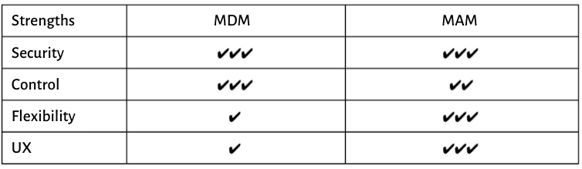
To compare MDM and MAM solutions, we focused on 4 points that, we believe, are essential: security, control, flexibility and user experience (UX).
Safety and security
MDM solutions have long been considered as the grail of security. All because of a rather simple idea: if you provide the device to your employees, and this device remains the property of the company, you tend to think that there is less risk of data hacking, less risk of information loss, etc.
Let’s sweep away this (bad) idea, which turns out to be false: just because your employee uses his own device does not mean that there is more (or less) risk of hacking, data loss or technical problems. Today, there are very advanced MAM solutions available, allowing companies to secure all information transmitted to employees quite simply.
Winner: tie
Control
MAM gives IT control over the corporate apps and the data inside them. MDM extends that control to the device itself: passcode policy, OS version floor, Wi-Fi and VPN profiles, restrictions, remote lock and wipe.
Control is not the same thing as visibility, and this is where most comparisons get it wrong. On a corporate-owned device, MDM does give IT a broad inventory and a broad policy surface. On a personal device enrolled under BYOD, it does not: the Android work profile is a separate, isolated container and the personal side stays out of the admin console, and Appaloosa cannot locate a BYOD device on either iOS or Android. What IT gains under BYOD is the ability to restrict, not the ability to read.
The practical question is therefore not "how much can I see" but "which controls do I actually need to enforce": network configuration, certificate distribution and OS compliance are MDM territory, application allow-listing and data leakage between apps are MAM territory.
Winner: MDM
Flexibility
The bad side of the “absolute control” of devices by companies, in the case you’re opting for an MDM solution, is that the employee won’t feel empowered, and won’t think he can do what he wants with his device (which won’t be his device, by the way). That means that he will spend less time with the device, and maybe be less productive.
There are situations where the implementation of MDM solutions has been totally boycotted by employees! Indeed, at a time where a large number of executives and company employees have opted for BYOD (Bring your own device), we are facing a fairly simple observation: MAM solutions offer much more flexibility for users.
If companies tend to favour control, this is a mistake, and it’s clear that MDM solutions are much more restrictive for the user. But it seems clear that you have to be attentive to the needs and desires of employees, so as not to lose them.
Winner: MAM
UX (User Experience)
In the era of BYOD, it seems that the vast majority of employees are moving towards ease, simplicity, the solution with as little friction as possible. They do not love a completely closed device, which does not belong to them and where they feel like they are constantly being watched. MDM solutions, even if they guarantee the confidentiality of users’ personal data (so as MAM), are now often considered, and perceived by users, as (too) intrusive.
Obviously, even if the company may like it, this isn’t the right solution for successful deployment and smooth adoption. On the contrary, a MAM solution, which focuses on apps and on a part of the device, will be accepted by users much more quickly. Of course, in some cases, such as those where employees work in special conditions that require special technical features (e. g. resistance to heat, cold, falls, etc.), it will almost be mandatory to opt for an MDM solution, and in this case, the user will also understand this. However, if this isn’t the case, and the company chooses MDM for reasons that the employee won’t consider essential, it is very likely that adoption will be slower and more obvious.
Winner: MAM
Conclusion
As you probably know, there is no right solution, however, there are better solutions than others, depending on the circumstances. The role of the team in charge of deploying EMM solutions will, therefore, be to find the solution that:
- Meets technical requirements
- Meets security requirements
- Allows for quick and easy deployment
- Is quickly adopted by the teams
ROI calculator
Not sure which MDM is worth it?
Compare the real cost. Calculate your MDM ROI in 2 minutes.
Calculate my ROI →When to move from MAM to MDM
Plenty of organisations start with MAM because it is the lighter commitment, then hit a ceiling. The signals that it is time to add device management are fairly consistent.
- You need to control the device, not just the apps. OS version floors, disk encryption checks, passcode rules and Wi-Fi or VPN profiles are device-level settings. No MAM product reaches them.
- You are buying the hardware. Once the company owns the device, the privacy argument for MAM largely disappears and zero-touch enrollment becomes available, which cuts provisioning from roughly 30 minutes to under 5 per device.
- You need shared or single-purpose devices. Kiosk mode, shared tablets in a store or a warehouse, and rugged handsets all require device-level lockdown.
- Audit pressure. Compliance reporting normally asks about the device posture, not only about the apps.
Moving from MAM to MDM is a project, not a switch. Assess what you actually need to enforce, pick the enrollment model per population, pilot on 20 to 50 devices, then roll out department by department. Fleets rarely go all-in on one model: it is common to run MDM on corporate hardware and MAM-style work profiles on personal phones, from the same console.
Where UEM fits
UEM (Unified Endpoint Management) is not a third competing approach. It is the same management model extended beyond phones and tablets to laptops and desktops, so that Windows and macOS endpoints are governed by the same policies and the same console as iOS and Android.
Choose the vocabulary that matches your scope. If your fleet is phones and tablets, you are buying MDM, possibly with MAM capabilities for BYOD. If it also includes laptops, you are buying UEM. The evaluation criteria do not change much: platform coverage, enrollment methods, app distribution, policy granularity, remote support and pricing per device.
The category label matters far less than the coverage. Ask a vendor which operating systems it manages natively today, and how quickly it shipped support for the most recent iOS and Android releases.
Ready to try Appaloosa? Start free